Miscellaneous

MVP Illustration

The term “Minimal Viable Product” - or more often just MVP - has become more and more used over the past decade. When explaining the concept I’ve often seen illustrations like this one:
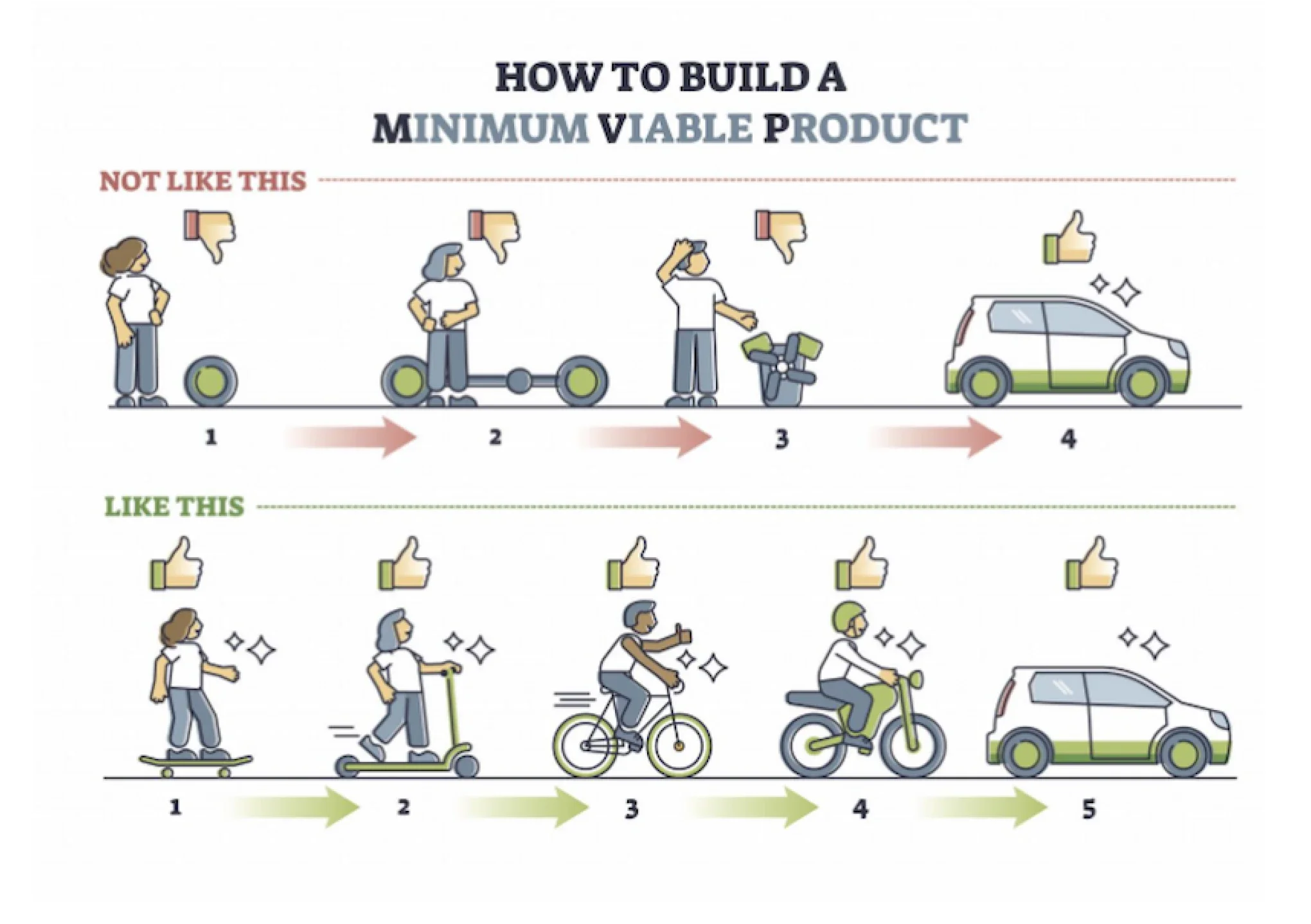
Typical bad illustration of MVP

I do, however, think these are bad illustrations, as they bring the wrong message.

  • The “Not like this” is fine to show that it’s not about building step by step - and not havig a usable product until the end.
  • The “Like this” is, however, not providing the right illustration. It shows you can buy/make the wrong product 5 times until you get it right.

When I am applying MVP - I want to start with the Minimum Viable Product. I want to start with a usable (a viable product) and add features and capabilities to this - not rebuild it from scratch in every iteration. This is why after playing with an AI generator a bit I’ve come up with a better illustration I use to explain MVP which I thing is far better.

LocalSend - Share files between local devices

Sometimes you need to move files between devices, and it’s often been quite a hassle to just being able to get a file from a Windows machine to an iPad or from Linux to a Mac laptop.

My most common case has often been to move files between MacOS and Android - and while Wifi File Explorer Pro has worked, it’s always seemed a little clumsy. It basically create a webserver on the Android device with a simple but quite usable interface.

Upgrading my Hiper internet (Fiber) with Ubiquiti

The home network finally got an upgrade. The uplink from the house is a 1G/1G fiber connection with Hiper as ISP. Wifi was running of a Google Wifi (1gen) network with 3 nodes in a network. It worked, but with Wifi being somewhat aged no device on wifi would be able to utilize the full bandwidth :(

This is just a brief post on the plan, the equipment and the future plans for this new Ubiquiti network.

Automatic MacOS shutdown

From time to time my Mac is doing stuff which takes quite awhile. Converting images, converting videofiles between formats or other stuff, which may take a long time (but reasonable predictable).

In those cases I run a little command in the terminal, to automatically shut down the Mac upon completion:

sudo shutdown -h +120

This command sets a timer which shutdown the machine after two hours (the 120 parameters being after 120 minutes).

Flight Control

flight-control

I really like simple games, which you can play where ever you are - and which still has enough challenges to be interesting for quite a while. One of the best games I’ve played for a long time is Flight Control for the iPhone/iPod Touch. The game was developed by Firemint.

It’s a fairly simple game. You’re in control of an Airport and all you have to do is make sure the planes land at the runways. To do this you simply draw their designated paths on the screen. There are 4 different aircrafts - helicopters, propeller planes, small jets and large jets. As you play more planes concurrently enters the airspace - and eventually it gets quite busy and avoiding mid-air collisions a challenge.

Better but Broken

Working with application development - either on the web, on the desktop or any other place - is often quite interesting. When making new releases features are added, changed - or in rare cases removed.

As a developer - or “software product manager” - it must be an interesting challenge to keep up with the users and the market to capture the features and changes to a product, which will make it better from release to release.

What is twitter?

One of the hottest sites on the web for more than a year is twitter, but what is Twitter?

  • I’ve tried a few times to explain it, and while it may be a fun task, it has often become quite a mess. This is an attempt to capture the most successful explanation of twitter.

The core of Twitter is a combination of three different characteristics:

  • Twitter is like a blog - An author publish content. It may be personal, it may be themed, it may be interessting - there are no set rules for the contents except those set by the author.
  • Twitter is like an SMS - There are a 140 character limit on each piece of content. If you need more, you need to split contents in several “twits”.
  • Twitter is a network - It’s no just a website. Through build in services and APIs you can connect with twitter through SMS, desktop clients, Instant messaging and many other ways. Besides a technical network, it’s also a social network where you can follow other interesting users, communicate with other users (private or in public).

That’s pretty much the core.

Simple Webpage Slideshow

At work we produce a few websites and have a few “web dashboards”. Wouldn’t it be nice, if public screens around the office could play a little loop mixing the websites and the dashboards together in a slideshow loop?

After an hour of javascript debugging, a nice little generic webpage slideshow was put together, and if you have a similar need a copy is now available in the lab. It’s simple, it should work in most browsers, and it probably has the least features of any slideshow out there.

Twittering

It seems I don’t find time to do too many stories to the site currently. I do however twitter occasionally. As a convenience I’ve added the latests twitters on the site too…

Nortel VoIP: It just feels wrong

XXX Lost image XXX

I have a VoIP phone on my desk. It’s part of the Corporate VoIP solution, and in most cases it works pretty well. One of my favorite features is the ability to act as a meeting phone with the speaker on. It usually works great, but there is one thing with the speaker feature, which just feels wrong – to turn off the speaker, you press the hangup buttom. Please fix this issue in a future firmware update, and allow the speaker buttom to act as a toggle that can turn the speak both on and off.